
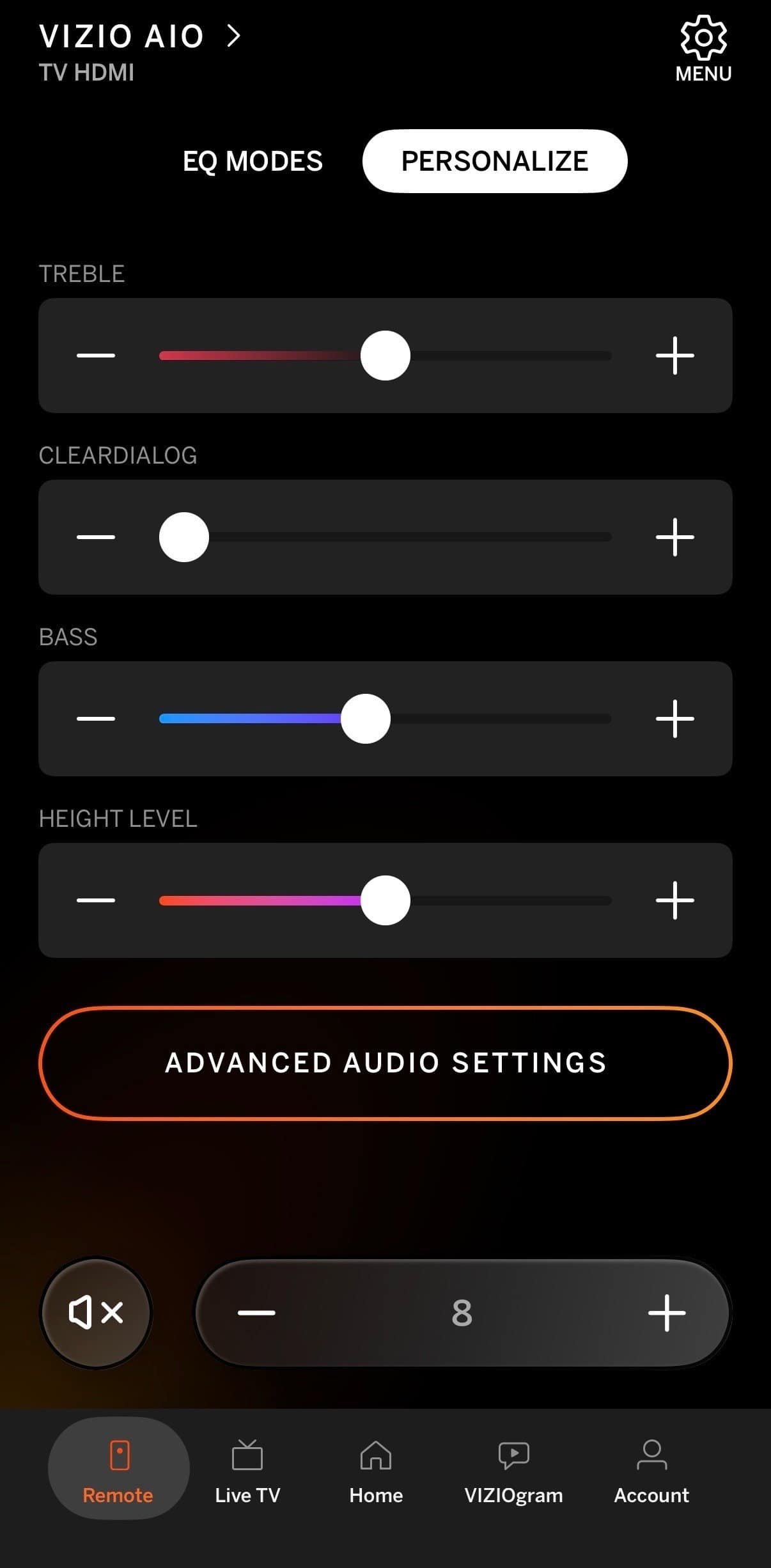
Most soundbars ship with a physical remote and a phone app, and which one you end up using is decided by your setup rather than by preference. If the soundbar is on HDMI ARC, the television remote handles volume and neither of the others gets touched. If it is on Bluetooth or optical, something has to control the bar, and that is where the choice becomes real. Our guide to choosing a soundbar covers the connection decision that sits upstream of this one.
Quick Verdict
The app wins for setup, EQ, and settings you change rarely but need properly. A physical remote wins for volume in the dark. On HDMI ARC the question mostly disappears, because the television remote does the daily work.
Key Takeaways
- HDMI ARC removes most of the need for either control.
- Apps expose settings physical remotes often cannot reach.
- Remotes work instantly; apps need unlocking and loading.
- An app depends on the manufacturer continuing to maintain it.
- Losing a remote is permanent in a way losing a phone is not.
How We Compared Them
These are compared on how they behave during actual use: changing volume mid-film, adjusting settings once, and getting the bar configured after unboxing. Where the comparison draws on ownership, that is stated plainly.
App vs Remote at a Glance
| Criterion | Phone app | Physical remote |
|---|---|---|
| Speed for volume | Unlock, open, wait | Immediate |
| Use in the dark | Screen lights the room | Buttons by feel |
| Settings depth | Full menus and EQ | Limited by button count |
| Firmware updates | Usually app only | Not possible |
| Long-term reliability | Depends on app support | Works until it breaks |
| Replaceability | Reinstall free | Often hard to source |
The Phone App, Pros and Cons
- Exposes EQ, dialogue modes, and night mode in labeled menus.
- Handles firmware updates, which a remote cannot do at all.
- Always with you, so nothing gets lost down the sofa.
- Requires unlocking the phone and waiting for the app to connect.
- A bright screen in a dark room is genuinely disruptive.
- Stops working properly if the manufacturer abandons the app.
An app suits initial setup, occasional settings changes, and anyone who dislikes accumulating remotes. Skip relying on it alone if you adjust volume constantly.
The Physical Remote, Pros and Cons
- Instant response with no unlocking or connecting.
- Usable by feel in a dark room without lighting anything.
- Works regardless of phone battery or software support.
- Limited buttons mean limited access to deeper settings.
- Cannot perform firmware updates.
- Easy to lose and often difficult to replace years later.
A remote suits frequent volume changes and evening viewing. Skip it if the soundbar is on ARC and the television remote already handles volume.
Which Is Better for Everyday Volume?
The remote, clearly. Volume is the control you touch most and the one where latency is most noticeable. Picking up a phone, unlocking it, opening an app, and waiting for it to connect is a long sequence for something a button does instantly.
The dark-room problem compounds it. A phone screen at full brightness during a film is disruptive in a way a remote never is, and turning brightness down makes the app harder to use.
Which Is Better for Settings?
The app, and it is not close. Night mode, dialogue enhancement, EQ, and input selection are all easier to find in a labeled menu than through a sequence of button presses interpreted by a small display or a colored light.
Many soundbars also expose settings in the app that the remote simply cannot reach, and firmware updates are usually app-only. That alone is a reason to install it even if you never use it for daily control.
What About HDMI ARC?
ARC changes the question. With it, the television remote controls soundbar volume directly, so neither the app nor the bar’s own remote gets used day to day. The app becomes a settings tool you open occasionally and the remote goes in a drawer.
This is the strongest practical argument for ARC over Bluetooth or optical, ahead of the audio format support that usually gets cited. A system operated by one remote is a system people actually adjust rather than leave alone. Our note on whether you need a subwoofer covers another decision where the practical answer differs from the specification answer.
Which Fits Your Situation
| If this is you | Better choice |
|---|---|
| Soundbar on HDMI ARC | TV remote, app for settings |
| Soundbar on Bluetooth or optical | Whichever you will actually keep to hand |
| You adjust volume constantly | Physical remote |
| You set it once and leave it | App |
| You lose remotes | App |
| You watch in the dark | Physical remote |
What I Use
My soundbar is a Vizio all-in-one connected over Bluetooth, and I control it entirely through the Vizio phone app. I do not have a physical soundbar remote in use at all. Day to day that means the television remote and my phone, and nothing else.
The app works, and the honest description is that it is fine for what I ask of it rather than ideal. Opening a phone to change volume is slower than pressing a button, and that is noticeable during a film rather than in principle.
It is worth saying that this setup follows from the Bluetooth connection rather than from choosing the app on its merits. If the bar were on HDMI ARC, the television remote would handle volume and the app would only come out for settings, which is the arrangement I would suggest to someone setting one up now.
The one place the app is unambiguously better is anything beyond volume. Finding the audio settings through a phone menu is straightforward in a way that pressing buttons and interpreting an indicator light is not.
How to Decide
Start with the connection rather than the control. If your television and soundbar both support HDMI ARC, use it, and this comparison becomes largely academic because the television remote takes over.
If you are on Bluetooth or optical, be honest about how often you change volume. Frequent adjustment favors a physical remote strongly enough that it is worth keeping one findable. Occasional adjustment makes the app perfectly adequate.
Either way, install the app. Firmware updates usually run through it, and settings you might only touch once are considerably easier to find there. Our roundup of smart plugs covers another device where app control is the only route to the settings. Our roundup of soundbars for small living rooms covers which bars expose what.
The Verdict
The remote wins for daily volume, the app wins for setup and settings, and HDMI ARC makes the whole question smaller by handing volume to the television remote.
The useful takeaway is that this choice is downstream of the connection. Sort that out first and the control question mostly answers itself.
Recommended Reading
See our comparison of soundbars and Bluetooth speakers, our guide to why music drowns out dialogue, our TV stand picks, and a guide to smart home hubs.
What People Get Wrong
That the app replaces the remote
It replaces it for settings and not for volume. Latency and screen brightness both matter more during actual viewing than feature depth does.
That the remote can do everything
Button count limits what a remote can reach, and firmware updates generally require the app. Installing it is worth doing even if you control the bar physically.
That losing the remote is a minor problem
Soundbar remotes are frequently difficult to source a few years after purchase. If yours is the primary control, knowing where it lives matters.
That this is a preference question
It is mostly a connection question. ARC hands volume to the television remote and reduces both options to occasional tools. Our roundup of surge protectors and power strips covers another part of the setup that gets decided by physical arrangement rather than preference.
App vs Remote FAQ
Can I control a soundbar without its remote?
Usually yes, through the manufacturer’s phone app, and often through the television remote if the bar is connected by HDMI ARC. Most bars also have basic buttons on the unit itself for power, volume, and input.
Is the phone app as good as the remote?
For settings it is better, since menus are labeled and expose options a remote cannot reach. For volume it is slower, because unlocking a phone and waiting for an app to connect takes longer than pressing a button. Most people end up using both for different things.
Does HDMI ARC let the TV remote control the soundbar?
Yes, and that is one of its main practical advantages. Volume and mute pass through to the bar, so a single remote handles everything. The feature usually needs enabling in the television settings rather than working automatically on connection.
What happens if the manufacturer stops updating the app?
An abandoned app can stop working after a phone operating system update, which leaves the soundbar without that control route. This is a real argument for keeping the physical remote even if you rarely use it.
Can I use a universal remote instead?
Often yes, if the soundbar uses standard infrared codes. Bars controlled primarily by app or Bluetooth may not be fully supported. Check compatibility with your specific model before buying one to solve this.
Why is my soundbar app slow to connect?
Bluetooth and network apps both need to establish a connection each time, which is the delay you notice. Keeping the app in recent memory helps slightly. This latency is the main practical reason people keep a physical remote for volume.
Do I need the app at all?
Worth installing even if you control the bar physically, since firmware updates usually run through it and some settings are app-only. You can install it, configure the bar once, and then rarely open it again.
My soundbar remote is lost. Can I replace it?
Sometimes, and it depends on the model and how old it is. Manufacturers do not stock remotes indefinitely, and third-party replacements vary in quality. The app is usually the faster answer, and it is worth checking it covers the functions you need.
