
Yes. Every Bluetooth connection compresses audio before it transmits, so some information gets discarded on the way.
Whether Bluetooth audio loses quality in a way you can actually hear depends on the codec, the volume, and the distance. Our roundup of portable Bluetooth speakers covers the hardware side of that question.
Quick Answer
Bluetooth sends compressed audio, so what reaches the speaker is not the original file. Newer codecs discard less and sound better at lower data rates. On a portable speaker at normal volume, the speaker and the room matter more than the codec. Distance causes more audible trouble than compression does.
Key Takeaways
- Bluetooth compresses audio. Ordinary use offers no lossless mode.
- The codec, not the word Bluetooth, sets how much you lose.
- Newer codecs beat older ones at a fraction of the data rate.
- Small speakers hide compression. Good headphones expose it.
- Range is not a fixed number and never has been.
- Distance trouble sounds like stutter and dropouts, not dullness.
- Quiet listening hides almost everything compression takes.
| What changes | Effect on the sound | How much you notice |
|---|---|---|
| Codec in use | Sets how much data survives the trip | Small on speakers, larger on headphones |
| Speaker size and drivers | Sets the ceiling for everything else | Usually the biggest single factor |
| Listening volume | Low volume masks fine detail loss | Large |
| Distance from the phone | Stutter, then dropouts | Obvious when it happens |
| Walls and obstacles | Weakens the signal further | Obvious |
| Source file quality | A poor file stays poor | Moderate |
| Other 2.4 GHz traffic | Interference and brief stutter | Varies by room |
Every Bluetooth Connection Compresses Audio
A codec compresses the audio stream at the source and decompresses it again at the speaker. That round trip is where information disappears.
This applies to every Bluetooth speaker and every phone. No setting turns it off, because the radio link cannot carry a full uncompressed stream.
What varies between devices is how much gets thrown away and how intelligently. That is entirely the codec’s job, and it happens without telling you. Our guide to making a Bluetooth speaker sound better covers the parts of this you can influence.
Why the Codec Decides More Than the Badge
Older codecs need more data
The original stereo codec works, and it needs a relatively high data rate to reach a good score. It was designed when radio bandwidth was the binding constraint.
Newer codecs do more with less
The newer generation reaches a higher quality score at well under half the data rate of the old one. That headroom gets spent on either better sound or longer battery life.
Both ends have to agree
A codec only runs if the phone and the speaker both support it. A capable speaker paired with an old phone falls back to the lowest common option.
You usually cannot see which one is running
Most speakers give no indication at all. For music, a data rate at or above 96 kbps is generally where quality holds up, and most modern pairings clear that comfortably.
What My Speaker Sounds Like to Me
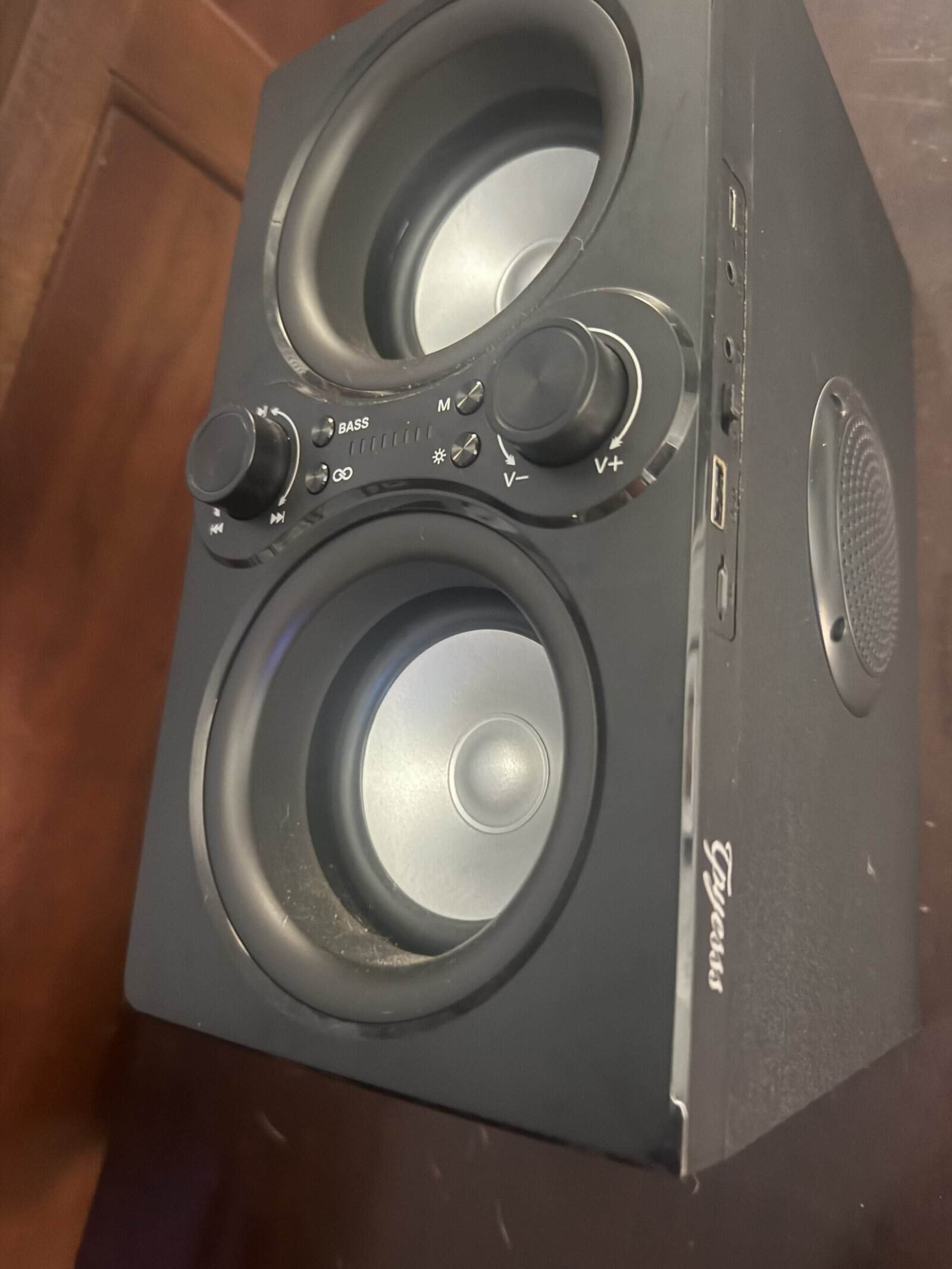
Mine is a large portable with a carry handle, and it has been in use for over two years. It has a bass button alongside knobs for volume and playback.
It sounds good to me and I have no issues with it. Music from my phone is what it does almost all the time, because my phone is usually already in my hand.
The one exception is distance. Too far away and it struggles, and the range is about what I would expect rather than a disappointment.
Age shows in the battery instead of the sound. That is the part of it that has changed over the time I have owned it.
The honest boundary is that this is one speaker at ordinary volume rather than a comparison against a cable. What a wired connection would add on this same box is not something my listening can answer. Our guide to how long a Bluetooth speaker battery should last covers the part that did change.
Distance Is the Part People Blame Last
Bluetooth range is not one number, and treating it as one causes most of the confusion here. Four things set it: transmit power, receiver sensitivity, antenna gain, and path loss.
Between those variables, reliable range runs from more than a kilometer at one extreme down to less than a meter at the other. Two speakers with identical logos can differ enormously.
Everything runs in the 2.4 GHz band, which walls, windows, glass, wood, metal, and concrete all attenuate. A phone in a back pocket puts a body between the radios.
The symptom is the giveaway. Distance produces stutter and dropouts, while compression produces flatness. If the sound breaks up rather than going dull, the problem is signal. Our guide to why a Bluetooth speaker keeps disconnecting covers the extreme version.
When Compression Becomes Genuinely Audible
Good headphones in a quiet room are where compression shows up first. Cymbals, room reverb, and the decay at the end of a note are the details that thin out.
High volume exposes it too, because quiet passages stop being quiet and the missing texture has nowhere to hide.
A poor source file overwhelms the question entirely. Compressing an already compressed stream twice costs more than either step alone.
On one small portable playing at background level, none of this is the limiting factor. The drivers and the room reach their ceiling long before the codec does. Our roundup of smart speakers covers the fixed alternative to a portable.
Getting the Best Out of a Wireless Connection
- Keep the phone out of your pocket. A body between the two radios costs more range than a wall does.
- Get the speaker off the floor. Height gives it a cleaner path to the source.
- Shorten the distance before blaming the speaker. Walk closer and see whether the stutter stops.
- Start with a decent source file. Streaming quality settings matter more than the codec.
- Watch the 2.4 GHz crowd. A busy band produces intermittent stutter that looks like a speaker fault.
- Update the phone when offered. Codec support arrives through software as often as hardware.
Our roundup of Bluetooth speakers with carry handles covers the portables built to be moved around while all of that applies.
Related Reading
Frequently Asked Questions
Does Bluetooth audio lose quality?
Yes, because every Bluetooth connection compresses the audio before sending it and decompresses it at the speaker. Some information is discarded in that process. How much of it you can actually hear depends on the codec both devices agree on, the listening volume, and the speaker doing the playback.
Is a wired connection always better?
On paper yes, since a cable carries the full stream without compressing it. In practice the gap narrows fast on a small portable speaker at background volume, where the drivers set the limit rather than the connection. On good headphones in a quiet room, the difference is easier to hear.
Which Bluetooth codec sounds best?
The newer generation of codecs reaches a higher quality score at well under half the data rate the older stereo codec needs. The catch is that both the phone and the speaker must support the same one, so a capable speaker paired with an older phone drops to the lowest shared option.
Why does my speaker sound worse across the room?
That is signal rather than compression. Range depends on transmit power, receiver sensitivity, antenna gain, and path loss through walls and furniture. The tell is the symptom: a weak signal produces stutter and dropouts, while compression produces a flat or dull sound that stays consistent at any distance.
Does the source file matter more than Bluetooth?
Often, yes. A low quality stream compressed a second time for transmission loses more than either step would alone. Raising the streaming quality setting in a music app usually produces a bigger improvement than chasing codec specifications, and it costs nothing but data.
Can I turn compression off?
No. The Bluetooth radio link cannot carry a full uncompressed audio stream, so compression is not an optional feature you can disable. The only way around it entirely is a wired connection, or a speaker that receives audio over a network instead of over Bluetooth.
Do expensive speakers lose less quality?
They may support better codecs, but that is rarely why they sound better. Driver size, cabinet design, and amplification account for most of the difference you hear. A large portable with good drivers on an average codec will beat a small one with an excellent codec.
Does volume affect how much you notice?
Considerably. At low or background volume, compression artifacts sit below what the room and the speaker are already masking. Turning it up removes that cover, so quiet passages and high frequency detail are where a compressed stream starts to sound thin.
